Electro-scheduler – Portable Free Appointment & Reminder Tool
Introduction
Do you ever forget an important meeting, a birthday, or a deadline because your calendar app is buried under a mountain of other notifications? In our busy lives, it is easy to lose track of time. While there are many complex scheduling applications available, sometimes you need something simpler, more focused, and, most importantly, portable.
Enter Electro-scheduler. This is a free, lightweight scheduling utility for Windows that helps you keep track of your daily appointments, tasks, and special dates. What makes it unique is its “green software” philosophy: it is completely portable, meaning you can run it from a USB drive without installing anything or leaving traces in your Windows registry.
Electro-scheduler provides visual and audible alarms to ensure you never miss an event. It has a dedicated feature for tracking anniversaries, and it displays your day’s schedule right on your screen. It is designed for personal use, offering a simple, no-fuss approach to time management. In this article, I will explore all its features, show you how to install and use it, and help you decide if it fits your daily needs.
Software Overview
Electro-scheduler is a free, portable scheduling application for Windows. It is designed to help users manage their daily appointments, tasks, and important events without the bloat of larger, more complex calendar suites.
At its core, Electro-scheduler focuses on four key functions:
- Appointment scheduling: Add events with specific dates and times, and set visual or audible alarms to remind you when they are due.
- Anniversary tracking: Dedicated fields and views for remembering birthdays, work anniversaries, and other recurring personal milestones.
- Daily task display: A clear, at-a-glance view of all your scheduled items for the current day.
- Portable operation: The software is “green” – it requires no installation, does not write to the Windows registry, and can be run directly from a USB flash drive or any folder.
The software is developed as a small, standalone executable file. Its interface is simple and straightforward, making it accessible to users of all technical levels. While it lacks advanced features like synchronization with online calendars or support for iCalendar (ICS) files, it excels at its primary goal: providing a reliable, easy-to-use reminder system for personal productivity.
Electro-scheduler is ideal for users who value simplicity, portability, and minimal system impact over an extensive feature set.
Main Features (Detailed Descriptions)
1. Portable “Green” Application
The standout feature of Electro-scheduler is its portability. It is a “green” application, which means:
- No installation required: You simply download the executable file and run it.
- No registry changes: It does not write any data to the Windows registry, keeping your system clean and avoiding conflicts with other software.
- Run from anywhere: You can place the
.exefile on your desktop, in a documents folder, or on a USB drive, and it will work immediately. This makes it perfect for use on shared computers, work PCs where you lack admin rights, or as a tool to carry with you.
2. Appointment Scheduling with Visual and Audible Alarms
Electro-scheduler allows you to create appointments with specific dates and times. For each event, you can set:
- Visual alarm: A pop-up window that appears on your screen at the scheduled time, showing the event details.
- Audible alarm: A sound notification that plays along with the visual alert, ensuring you notice the reminder even if you are not looking at the screen.
This dual-alarm system is effective for catching your attention during busy moments.
3. Anniversary Tracking
Beyond regular appointments, Electro-scheduler has a dedicated feature for tracking anniversaries. This is a separate category for events that recur yearly, such as:
- Birthdays
- Work anniversaries
- Wedding anniversaries
- Other annual milestones
By separating these from daily tasks, the software helps you keep your regular schedule clean while still reminding you of important recurring personal dates.
4. Daily Appointments and Tasks Display
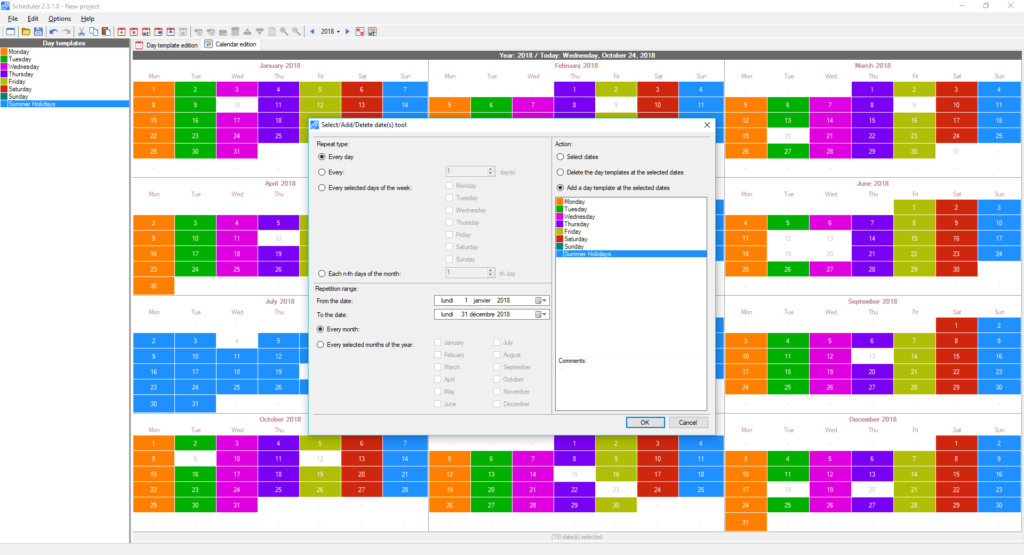
When you launch Electro-scheduler, it provides a clear, on-screen summary of your events for the current day. This “at-a-glance” view includes:
- All appointments scheduled for that date.
- Upcoming tasks or events for the near future.
- Any anniversaries falling on that day.
This immediate overview helps you plan your day without navigating through multiple menus or views.
5. Simple, Intuitive User Interface
Electro-scheduler is built with a focus on simplicity. The user interface is straightforward, with clear fields for entering event details, dates, and times. It avoids complex menus and options, making it easy for anyone to start scheduling within seconds. This is a significant advantage for users who find other scheduling applications overwhelming or overly complex.
6. Low System Resource Usage
As a lightweight tool, Electro-scheduler uses minimal system resources (CPU and memory). It runs quietly in the background, ensuring that it does not slow down your computer or interfere with other applications. This makes it suitable for older or less powerful Windows machines.
System Requirements
| Component | Requirement |
|---|---|
| Operating System | Windows 11, 10, 8, 7, Vista, and XP (32-bit and 64-bit) |
| Processor | Any modern processor (1 GHz or faster recommended) |
| RAM | 256 MB or more |
| Hard Disk Space | Less than 10 MB for the executable file |
| Additional Software | None – standalone executable |
| Administrator Rights | Not required (runs as a standard user) |
Installation Steps (Numbered Format)
Because Electro-scheduler is a portable “green” application, there is no traditional installation process. Follow these simple steps to start using it:
Step 1: Download the Executable
- Go to a trusted source (CNET Download or the developer’s official website).
- Download the
Electro-scheduler.exefile (or similar name).
Step 2: Save the File
- Choose a location to save the file. Options include:
- Your Desktop for easy access.
- A dedicated folder (e.g.,
C:\Programs\Electro-scheduler). - A USB flash drive for portability.
- Remember the folder where you saved it.
Step 3: Run the Application
- Double-click the
Electro-scheduler.exefile. - The software will launch immediately. No setup wizard, no registry prompts, no administrator permissions required.
Step 4: (Optional) Create a Shortcut
- If you saved the file in a deep folder, you can create a shortcut on your desktop or taskbar for quicker access.
- Right-click the
.exefile, select “Create shortcut”, and drag the shortcut to your desired location.
Step 5: First-Time Use
- Upon launch, you will see the main interface, which typically includes:
- A field to add new events.
- A display area showing today’s appointments.
- Buttons to manage anniversaries.
- Start adding your first event by entering the title, date, time, and alarm settings.
Step 6: Keep the File Safe
- Your schedule data is typically saved in a file within the same folder as the executable (or in the user’s AppData folder, depending on the developer’s implementation).
- To back up your schedule, simply copy the entire folder containing the
.exeand its data files to a safe location.
Uninstallation is just as simple: Delete the Electro-scheduler.exe file and its associated data file. No uninstaller is needed, as nothing was added to the registry.
Pros and Cons Table
| Pros | Cons |
|---|---|
| ✅ Completely portable – no installation needed | ❌ No synchronization with online calendars (Google, Outlook) |
| ✅ Does not write to the Windows registry | ❌ Does not support iCalendar (ICS) import or export |
| ✅ Includes both visual and audible alarms | ❌ Limited advanced recurring event options (no complex recurrence rules) |
| ✅ Dedicated anniversary tracking feature | ❌ Interface is simple and may feel dated to some users |
| ✅ Displays daily appointments at a glance | ❌ No mobile app or cross-platform support |
| ✅ Free to use | ❌ Limited to personal use; lacks business-focused collaboration tools |
| ✅ Extremely lightweight and uses minimal system resources | ❌ No detailed documentation or help system inside the app |
| ✅ Ideal for use on shared or restricted PCs | ❌ Information on the user interface and features is not elaborated in the description |
| ✅ No administrator privileges required | ❌ Development may be discontinued or not actively updated |
| ✅ Easy to uninstall – just delete the file | ❌ Functionality is basic compared to full-featured schedulers |
Practical Use Cases and Benefits
1. Personal Daily Planning
For students, freelancers, or anyone with a busy personal schedule, Electro-scheduler provides a simple way to keep track of daily tasks, appointments, and deadlines. You can quickly note down a to-do item or a meeting time without opening a heavy calendar application. Benefit: Saves time and reduces the mental load of remembering everything.
2. Celebrating Anniversaries and Birthdays
Never forget a birthday, work anniversary, or any recurring personal milestone again. By using the dedicated anniversary section, you can set yearly reminders that will pop up with alerts. Benefit: Helps maintain personal and professional relationships by ensuring you never miss an important date.
3. Using on a Work or Shared Computer
If you work in an environment where you do not have administrator rights to install software, Electro-scheduler is a lifesaver. Since it is portable, you can run it directly from a USB drive or a network folder. Benefit: Take your schedule with you and use it securely on any Windows PC.
4. Minimalist Time Management
For users who find applications like Microsoft Outlook or Google Calendar to be overwhelming, Electro-scheduler offers a minimalist alternative. It focuses on core scheduling tasks without the extra features (like email integration, task hierarchies, or collaborative workspaces). Benefit: A distraction-free tool that does exactly what you need – remind you of appointments.
5. Tired of Calendar Bloat?
Some users want to isolate their schedule from their email or a complex project management system. Electro-scheduler acts as a standalone calendar, keeping your appointments separate. Benefit: Simplifies your digital workspace by separating scheduling from other communication or productivity tools.
6. Quick Access Reminders
You can place the Electro-scheduler executable on your desktop. With a single click, you can instantly view your day’s events or add a new reminder. Benefit: Faster access to your schedule compared to navigating through a larger application or a web browser.
FAQs (Frequently Asked Questions)
1. Is Electro-scheduler completely free?
Yes. Electro-scheduler is free software. There is no charge to download, use, or share the tool. It is offered as a freeware utility.
2. What does it mean that the software is “portable” or “green”?
A portable application does not require installation. It runs directly from its executable file and does not write any settings or data to the Windows registry. This means it will not leave traces on your computer, and you can run it from a USB drive on any Windows PC. It is “green” in the sense that it is clean and does not clutter your system.
3. Can I sync my Electro-scheduler events with Google Calendar or Outlook?
No. Electro-scheduler does not have synchronization capabilities. It operates as a standalone desktop application. Your appointments and reminders are stored locally on your computer.
4. Does the software support importing or exporting events in iCalendar (.ics) format?
According to user feedback, the software does not currently support importing or exporting iCalendar files. This is a noted limitation. You must enter your events manually within the application.
5. Can I set complex recurring appointments (e.g., every second Tuesday)?
The information available does not detail advanced recurring event options. The software supports annual tracking for anniversaries, but it may not support complex recurrence rules like “every Tuesday and Thursday for two months”. The current version (1.0.1) is designed for simple scheduling.
6. How do I get an audible alarm to work?
You need to ensure that your Windows system sounds are enabled. When you create an appointment, there is likely an option to set an “Alarm” or “Reminder” type. If you choose an audible alarm, the software will play a sound through your speakers or headphones at the set time. Check your system volume if you do not hear the alarm.
7. What happens to my saved appointments when I close the software?
Your appointments and reminders are saved to a data file (often in the same folder as the executable). When you reopen Electro-scheduler, your events should still be there. You must keep both the .exe file and the data file together for your schedule to persist.
8. Is Electro-scheduler suitable for business use?
The software is described as suitable for “personal use.” It lacks collaboration features, synchronization, and advanced reporting required for most business environments. For a business setting, a more robust solution like Microsoft Outlook or a shared online calendar would be more appropriate.
9. Where can I find help or documentation for Electro-scheduler?
The software is designed to be simple and intuitive, so it may not have extensive built-in help. The developer’s website (if available) or the CNET download page may offer some information. User reviews or forums can sometimes provide tips from other users.
10. Why would I choose Electro-scheduler over the Windows built-in calendar or reminders?
Electro-scheduler offers portability and a dedicated anniversary tracker in a single, focused tool. It is simpler to access without navigating the broader Windows ecosystem or an internet browser. Its key advantage is the ability to run it from a USB drive without installation, making it ideal for use on computers where you cannot install software.
Conclusion
Electro-scheduler is a straightforward, portable scheduling tool that focuses on the essentials: reminding you of your daily appointments, tasks, and important anniversaries. Its “green,” no-install philosophy is its greatest strength. If you need a simple calendar on a shared or restricted computer, or if you prefer not to clutter your registry with every small utility you try, Electro-scheduler fits perfectly into that niche.
However, it is important to recognize what it is not. It is not a collaborative business tool. It does not sync with the cloud or with mobile devices. It does not handle complex recurring schedules or allow for importing and exporting of calendar data in standard formats. For users who require these features, this software will feel limiting.
Ultimately, Electro-scheduler is best viewed as a lightweight companion for personal time management. It works well for someone who values simplicity and portability above all else. If that description fits you, give it a try—there is no risk, no installation, and no cost. Just download, run, and start organizing your day.
Disclaimer: This guide is for informational purposes. Electro-scheduler is a third-party tool. The author is not responsible for any data loss or system issues. Always back up your important data.