ZoogVPN 2026 – Is This Free VPN for Windows Worth It
Finding a reliable VPN that balances privacy, speed, and cost can feel like searching for a needle in a haystack. You see dozens of services promising the world, but many are either too expensive, too slow, or simply not trustworthy. If you’ve been looking for a straightforward way to protect your Windows PC without breaking the bank, ZoogVPN for Windows might have caught your attention.
So, what exactly is ZoogVPN? In a nutshell, it’s a virtual private network service designed to encrypt your internet traffic, mask your real IP address, and help you browse the web more privately. Unlike some complex enterprise-level tools, ZoogVPN focuses on simplicity: you install it, log in, and connect with one click. It’s especially useful when you’re hopping on public Wi-Fi at a coffee shop or airport, as it adds a crucial layer of security against snoopers.
But is it the right choice for you? This article dives deep into every aspect of ZoogVPN for Windows. We’ll explore its main features, system requirements, installation steps, and real-world use cases. We’ll also look at the pros and cons honestly, so you can decide if this VPN suits your daily online activities—whether that’s streaming, casual browsing, or just keeping your data away from prying eyes.
Software Overview
ZoogVPN is a cross-platform VPN service that offers a dedicated Windows client. The software is developed by a company that positions itself as a “no-logs” VPN provider, meaning it claims not to track or store your online activities. This is a critical feature for anyone concerned about privacy.
The Windows application comes in both free and premium versions. The free plan is a great starting point: it gives you 2GB of data per month, access to a limited number of servers, and standard encryption. The premium tiers unlock unlimited bandwidth, more server locations (including optimized streaming servers), and faster connection speeds.
One of ZoogVPN’s selling points is its support for multiple VPN protocols, including OpenVPN and IKEv2. These are industry-standard protocols known for their security and stability. The software also includes a kill switch feature (on premium plans), which automatically cuts your internet if the VPN connection drops—preventing accidental data leaks.
The interface is clean and minimalistic, making it accessible even for first-time VPN users. You don’t need to be a tech wizard to change server locations or toggle encryption settings. Overall, ZoogVPN aims to deliver a no-nonsense privacy tool for everyday Windows users, with the option to upgrade for more advanced needs.
Main Features Explained in Detail
1. Strong Encryption with Multiple Protocols
ZoogVPN uses military-grade encryption (AES-256) to protect your data. When you connect to a server, all your incoming and outgoing traffic is scrambled into unreadable code. This is especially important on public Wi-Fi networks, where hackers can easily intercept unencrypted data.
The software supports OpenVPN (TCP and UDP) and IKEv2. OpenVPN is highly configurable and secure, while IKEv2 is excellent for mobile or unstable connections because it can quickly re-establish a dropped VPN link. You can switch between protocols within the Windows app’s settings.
2. Global Server Network (Paid & Free)
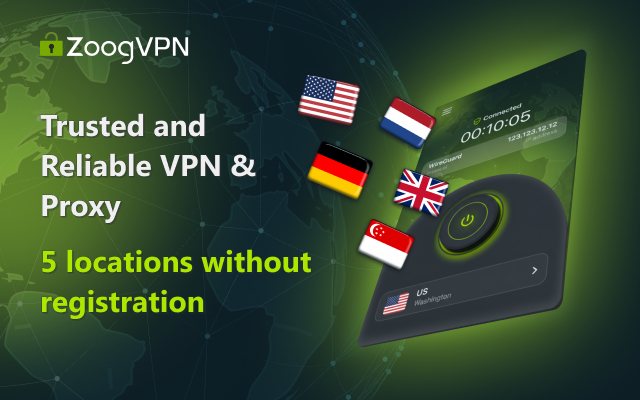
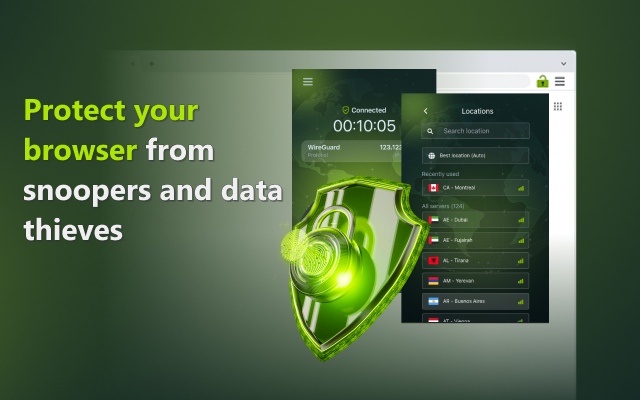
ZoogVPN maintains a network of 1Gbps dedicated servers across multiple countries. Free users get access to a subset of these servers (e.g., USA, UK, Netherlands, etc.), while premium subscribers unlock the full list, including locations in Asia, Australia, and more.
These servers allow you to bypass geo-restrictions—for example, accessing US Netflix or BBC iPlayer from another country. The company regularly updates its server list to improve connection stability and speed.
3. Built-in Kill Switch (Premium Feature)
A kill switch is a safety net. If your VPN connection suddenly drops, the kill switch blocks all internet traffic from your Windows PC until the VPN is reconnected. This prevents your real IP address and unencrypted data from being exposed.
On ZoogVPN for Windows, this feature is optional and can be toggled on/off in the settings. It’s highly recommended for users who handle sensitive information or want maximum privacy.
4. No-Logs Privacy Policy
ZoogVPN states that it follows a zero-logs policy. This means they do not collect or store any records of your browsing history, traffic destination, data content, or DNS queries. The only information they might keep is basic account details (email, payment info for paid users) and connection timestamps for troubleshooting—but not the actual activity logs.
This policy is aligned with privacy-focused VPN standards, though it’s always a good idea to read their latest privacy policy on their official website for any updates.
5. Support for Streaming and P2P
Many VPNs block P2P traffic on certain servers, but ZoogVPN allows torrenting on specific optimized servers (available on paid plans). Similarly, it works with popular streaming services like Hulu, Netflix, and YouTube. Some free servers might be blocked by streaming platforms, but premium subscribers get access to dedicated streaming servers that are regularly updated to bypass these blocks.
6. Simple One-Click Connect Interface
The Windows application features a large “Connect” button on the main screen. Once you log in, you can click it to instantly connect to the fastest available server. Alternatively, you can manually select a country from a drop-down list.
This simplicity is perfect for users who don’t want to fiddle with technical settings. Behind the scenes, the app automatically chooses the best protocol for your network.
System Requirements
Before downloading ZoogVPN for Windows, make sure your PC meets the minimum requirements for smooth operation. The software is lightweight and runs without consuming excessive resources.
| Component | Minimum Requirement | Recommended |
|---|---|---|
| Operating System | Windows 7, Windows 8, Windows 8.1 | Windows 10 or Windows 11 |
| Processor | 1 GHz or faster | 2 GHz dual-core |
| RAM | 1 GB | 2 GB or more |
| Hard Disk Space | 100 MB free | 200 MB free (for logs) |
| Internet Connection | Broadband (Wi-Fi or wired) | 10 Mbps or higher |
| Additional Software | None (standalone installer) | Latest Windows Updates |
Note: ZoogVPN also supports Windows Vista and XP according to older specifications, but for security and performance, a modern version of Windows is strongly recommended.
How to Install ZoogVPN on Windows (Step-by-Step)
Follow these simple steps to get ZoogVPN up and running on your Windows PC. The entire process takes less than five minutes.
- Download the installer
Visit the official CNET Download page or the ZoogVPN website. Click the “Download” button to save the setup file (e.g.,ZoogVPN_Setup.exe) to your computer. - Run the installer
Locate the downloaded file (usually in your “Downloads” folder). Right-click it and select “Run as administrator” to ensure proper installation. - Allow permissions
Windows may show a User Account Control popup asking if you want to allow the app to make changes. Click “Yes.” - Follow the setup wizard
The installation wizard will open. Click “Next,” read the license agreement, then select “I Agree” to proceed. You can choose the destination folder (default is fine) and decide whether to create a desktop shortcut. - Complete the installation
Click “Install” and wait a few seconds for the files to copy. Once finished, click “Finish.” You may check “Launch ZoogVPN” to open the app immediately. - Create an account or log in
When you first launch ZoogVPN, you’ll be prompted to log in. If you don’t have an account yet, click “Sign Up” to create a free account (you’ll need an email address). Verify your email via the link sent to your inbox. - Connect to a server
After logging in, the main interface appears. Click the large “Connect” button to automatically connect to the optimal server. Or, click the server location dropdown, select a country (e.g., USA, UK), then click Connect. - Verify your VPN is on
Once connected, the button will change to “Disconnect,” and you’ll see a “Protected” status. You can check your new IP address by visiting a site like “whatismyip.com.”
That’s it! You are now browsing securely. To disconnect, simply click the “Disconnect” button.
Pros and Cons
To help you make an informed decision, here’s an honest look at the advantages and limitations of ZoogVPN for Windows based on real user feedback and technical analysis.
| Pros ✅ | Cons ❌ |
|---|---|
| Offers a permanent free plan (2GB/month) | Free plan has bandwidth limit (2GB) |
| Simple, clean, and beginner-friendly interface | Limited server selection for free users |
| Strong encryption (AES-256) with OpenVPN/IKEv2 | No live chat support (email/ticket only) |
| No-logs policy for privacy | Kill switch only available on paid plans |
| Works with streaming services (Hulu, Netflix on premium) | Smaller server network compared to top competitors |
| Allows P2P/torrenting on specific paid servers | Speeds can vary depending on server load |
| Cross-platform (Windows, Mac, iOS, Android) | Some users report occasional login issues (see user review) |
| 1Gbps server speeds on premium | Free plan doesn’t include all protocol options |
Practical Use Cases and Benefits
1. Securing Public Wi-Fi at Airports or Cafes
You’re sitting in a coffee shop, working on your laptop. The free Wi-Fi has no password. Anyone on the same network could potentially intercept your emails or login credentials. By running ZoogVPN, all your data becomes encrypted, turning that risky public hotspot into a secure private connection.
2. Bypassing Geo-Blocks for Streaming
Ever tried to watch a YouTube video or a Netflix show only to see “This content is not available in your country”? With ZoogVPN (premium plan), you can connect to a server in the US or UK and access that content as if you were there. This also works for BBC iPlayer, Hulu, and other regional services.
3. Avoiding Bandwidth Throttling by Your ISP
Some internet service providers slow down certain types of traffic—like streaming or gaming—especially during peak hours. Because ZoogVPN encrypts all your traffic, your ISP cannot see what you’re doing online, so they cannot selectively throttle your connection based on activity type. You may experience more consistent speeds.
4. Safe Torrenting (Premium Users)
If you download legal torrent files (e.g., Linux distributions, open-source software, or public domain media), ZoogVPN allows P2P traffic on specific servers. The encryption hides your IP address from other peers in the swarm, adding a layer of anonymity.
5. Protecting Sensitive Work Data
Remote workers often log into company dashboards, email, or cloud storage from home networks. A VPN like ZoogVPN ensures that even if your home router is compromised, the data leaving your computer remains encrypted. This is especially valuable if you handle client information or financial data.
Frequently Asked Questions (FAQ)
1. Is ZoogVPN completely free for Windows?
ZoogVPN offers a free plan that includes 2GB of data per month, access to a limited number of servers, and standard encryption. It never expires. However, the free plan does not include premium features like unlimited bandwidth, the kill switch, P2P servers, or priority support. For more heavy usage, you would need a paid subscription.
2. Does ZoogVPN keep logs of my activity?
According to the company’s privacy policy, ZoogVPN follows a zero-logs practice for browsing activity, DNS queries, traffic content, and IP addresses. They may retain minimal account data (like email address) and connection timestamps for troubleshooting, but not your actual online history. Always review the latest policy on their official website.
3. Can I use ZoogVPN to watch Netflix on Windows?
Yes, but with a caveat. The free plan servers are often blocked by Netflix. Paid subscribers can access dedicated streaming servers that are optimized to work with Netflix, Hulu, BBC iPlayer, and others. These servers are regularly updated to bypass geo-restrictions.
4. Why does the free plan only give 2GB per month?
The 2GB monthly limit on the free plan is designed for light usage—like checking email, doing a quick secure transaction, or occasional browsing. It allows users to test the service without commitment. For streaming, downloading files, or daily use, the 2GB would be consumed very quickly. Upgrading to a paid plan removes this limit.
5. What should I do if ZoogVPN won’t let me log in?
Some users (as seen in reviews) have reported login issues. First, ensure you’ve verified your email address after signing up. Try resetting your password via the “Forgot Password” link. If the problem persists, uninstall the software, restart your PC, and reinstall the latest version from the official source. You can also contact ZoogVPN support via their ticket system.
6. Does ZoogVPN work on Windows 11?
Yes. Although the official specs list Windows 10 and older versions, the ZoogVPN client is compatible with Windows 11 as well. The installation and functionality are the same. Just make sure you have the latest version (4.0.7 or newer) for optimal compatibility.
7. Can I use ZoogVPN for torrenting?
Torrenting (P2P file sharing) is allowed only on specific servers and is a premium feature. Free users cannot use P2P traffic. If you are a paid subscriber, connect to a server marked as “P2P allowed” in the server list. Always ensure you are downloading legal content.

Conclusion
So, is ZoogVPN for Windows the right VPN for you? The answer depends on what you need.
If you’re a casual user looking for a simple, free, and trustworthy way to encrypt your public Wi-Fi sessions or briefly mask your IP address, ZoogVPN’s free plan is an excellent starting point. It offers strong encryption, a no-logs policy, and a dead-simple interface—all without bombarding you with ads. The 2GB monthly limit is enough for light tasks like online banking or checking emails while traveling.
On the other hand, if you are a streaming enthusiast, a frequent torrent user, or someone who needs a VPN running 24/7, the free plan will feel too restrictive. In that case, upgrading to a premium ZoogVPN subscription unlocks unlimited bandwidth, many more server locations, a kill switch, and dedicated streaming/P2P servers. Even then, it’s worth comparing ZoogVPN’s premium tier to larger competitors like NordVPN or Surfshark, which offer larger server networks and more advanced features like multi-hop or ad blocking.
Ultimately, ZoogVPN delivers exactly what it promises: a straightforward, reliable VPN solution for Windows users who value privacy without complexity. Give the free version a try. If you like it and need more, their paid plans are reasonably priced. Either way, you’ll be taking a positive step toward a safer, more open internet experience.